
Collaboration
VERA provides a variety of tools to help you manage collaborators within your experiments. This section provides an overview of how to use these tools to manage collaboration in your experiments.
Managing collaborators
You can manage collaborators for your experiment by clicking Manage Collaborators on the Experiment Setup page. From here, you can add or remove collaborators, as well as view the list of current collaborators.
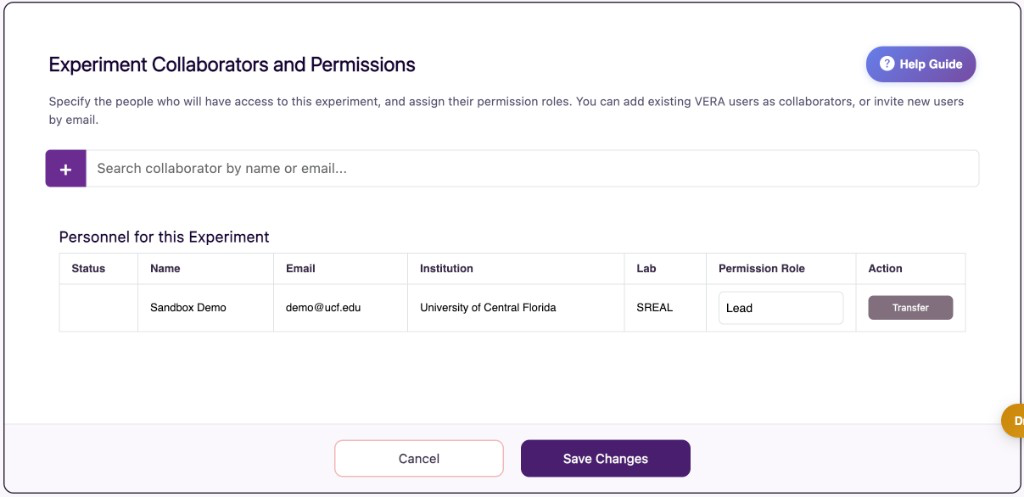
You’ll always see the lead of the experiment listed here. Experiment leads cannot be removed from the experiment.
To add a collaborator, search by name or email in the search bar. If they already have a VERA account, select their entry to add them. If they do not yet have a VERA account, you can send an email invitation so they can sign up.
Invites sent to new users (people who do not yet have a VERA account) can only be sent by the experiment Lead. Read/Write collaborators can request to add existing VERA users or to remove collaborators; those requests are submitted for lead approval. The change will not take effect until the lead approves it.
When a request is pending, the lead will see a Personnel changes awaiting lead approval section, with Approve and Decline actions. The requester will see that the change is awaiting lead approval.
Click Save Changes after making edits in this panel.
Transferring experiment leadership
Every experiment has exactly one Lead. The lead can transfer ownership of the experiment to another collaborator using the Transfer action on their own row in the personnel table.
The collaborator who will become lead must already be on the experiment. After the current lead starts a transfer, VERA emails the new lead. They must accept via email before the transfer takes effect. Until they accept, the personnel table will show that a Leadership transfer is pending. The request expires if it is not accepted in time.
Leadership cannot be transferred while the experiment is in Collection Mode (data collection). Return the experiment to Draft if you need to transfer lead before or after a collection cycle.
Only the experiment lead can delete the experiment. After a transfer is accepted, that ability moves to the new lead.
Collaborator roles
You can assign a role to each collaborator in your experiment. These roles are as follows:
Read/Write: Can view AND edit all experiment settings. Can view and record new participant data. Can request to add or remove collaborators; those requests require the experiment lead’s approval.
Read Only: Can only view experiment settings and data. Cannot make any changes to the experiment settings or add new collaborators. Can view and record new participant data.
In addition to these assignable roles, every experiment has a single Lead. The lead has full control over the experiment, including approving personnel changes, transferring leadership, and deleting the experiment.