Web interface: experiment distributions
VERA provides a variety of options for distributing your experiments to participants. This section provides an overview of the different distribution methods available through the VERA web interface, and how to use them for your specific needs.
Before continuing, it may be useful to review the Web interface: overview section to understand the general layout and features of the VERA web portal.
Understanding VERA’s distribution functionality
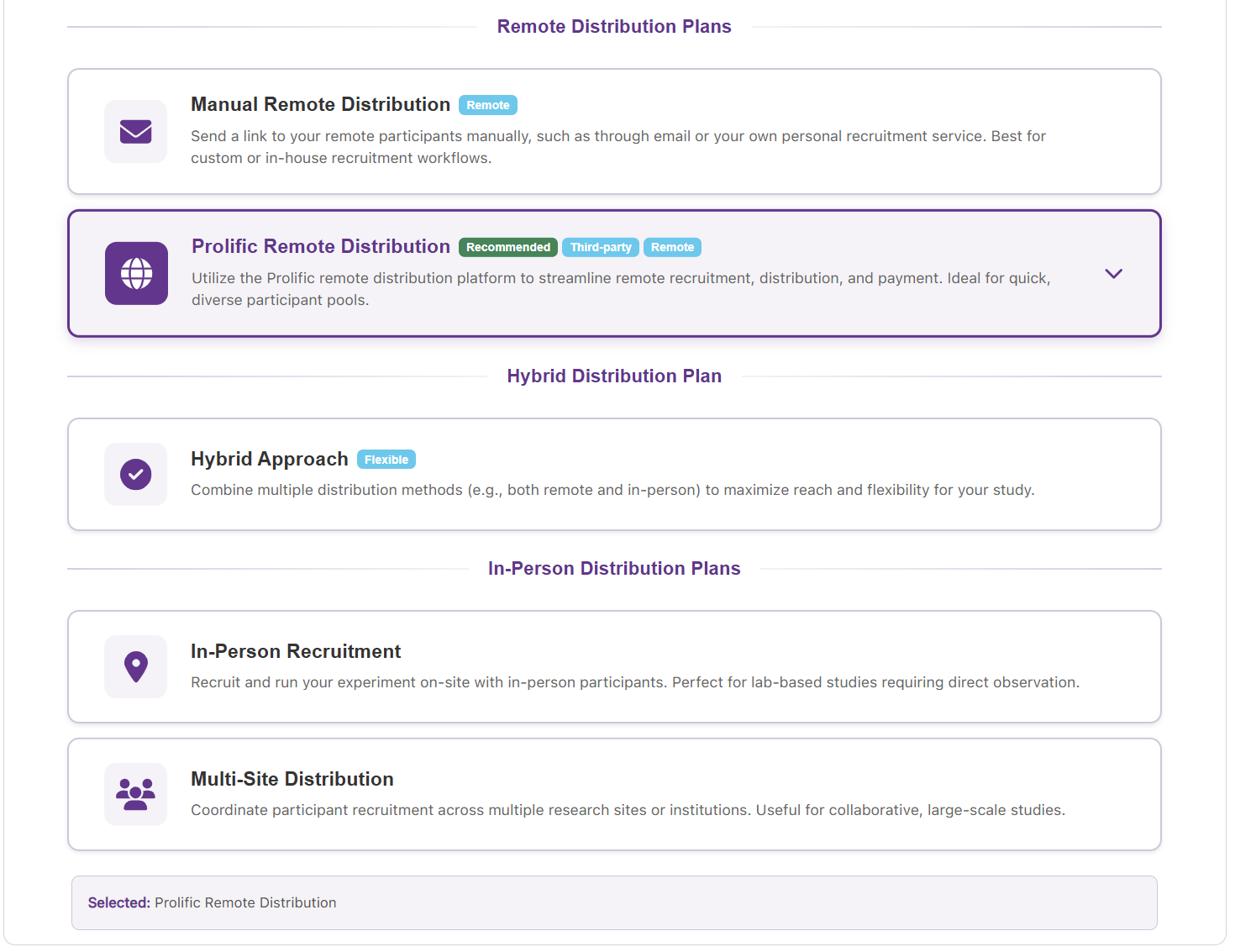
VERA supports multiple methods for distributing your XR experiments to participants. Some of these methods are designed to follow more traditional in-person experimental protocols, while others are designed to facilitate remote participation through web-based access.
Each available distribution method works for different specific use cases, and it is important to understand the differences between them to choose the best option for your experiment.
You can select your desired distribution method from the Experiment Flow card on the Experiment Setup page. Open the participant distribution step to choose a method. This selection can be changed later from the same card, while the experiment is still in Draft.
Remote distribution methods
VERA provides remote options for distributing your experiments. These methods allow participants to access and complete your experiments directly through their own web browser, without the need for any downloads or installations. They can complete the experiment fully remotely, fully asynchronously, and from any location with internet access, with no need for supervision or monitoring.
Note
VERA strongly recommends you consider remote distribution as an option for your experiments, if possible for your specific research goals. Remote distribution not only allows you to reach a larger participant pool with no supervisional requirements or time commitments, but also provides you with a more diverse, accessible, and inclusive participant base, reaching a wider variety of demographics and physical abilities than standard in-person distribution methods.
The remote distribution methods provided by VERA are listed below.
Prolific remote distribution (recommended)
VERA provides built-in support for distributing your experiments through the Prolific platform. Prolific is an online participant recruitment platform designed specifically for research studies. It allows researchers to easily recruit participants from a diverse pool of individuals, and provides tools for managing participant payments and data collection.
VERA highly recommends considering Prolific as your remote distribution method of choice, as it greatly reduces overhead involved with recruiting and managing participants, as well as greatly increases the quality of the data collected.
For more details, see the Prolific integration section.
Custom Remote Distribution
VERA also provides a general remote distribution method which does not require the use of Prolific. This method allows you to share your experiment’s unique URL with participants through any desired means, such as email, social media, or online forums. This can be useful if you have a specific participant pool in mind, or if you wish to distribute your experiment through your own channels.
To use Custom Remote Distribution, follow the steps below:
Select Custom Remote Distribution. On the VERA web interface, open the Experiment Flow card of your experiment. Open the participant distribution step and select Custom Remote Distribution.
Build and test your experiment. Before distributing your experiment, make sure to build it from Unity and test it out using your experiment’s unique URL to ensure everything is working as expected.
Distribute your experiment URL. Copy your experiment’s unique URL from the Custom Remote distribution step, or from Distribution Link in the experiment’s dashboard card menu. Share this URL with your desired participant pool through your chosen communication channels.
From the participant’s perspective, after receiving the link, they can click on it to be taken to your experiment hosted on the VERA web interface, where they can complete the experiment directly through their web browser. You can then see their results in the VERA web interface.
Note
When using Custom Remote Distribution, it is important to consider that you are responsible for finding, communicating with, and managing your own participant pool. If you’d rather have a pre-screened, diverse, and reliable participant pool managed for you, consider using the Prolific remote distribution method instead.
In-person distribution methods
In addition to remote distribution methods, VERA also provides an option for distributing your experiments in-person. This method is designed for traditional experimental protocols where participants complete the experiment under supervision in a controlled environment.
In-Person Recruitment
This distribution method is designed for traditional in-person experimental protocols, where participants complete the experiment under supervision in a controlled environment at a single in-person location.
To use this method, copy your experiment link from the Experiment Flow card (or from Distribution Link in the dashboard card menu) and paste it into your lab’s XR device. Participants can then complete the experiment directly through the device, under supervision. You can then see their results in the VERA web interface.
If necessary, you can also use this method to run the experiment directly from the Unity editor, or your own built application. This will bypass the WebXR hosting provided by VERA, but will still record data to the VERA web interface.
Note
It is highly recommended that you use VERA’s WebXR hosting for your experiments whenever possible, instead of running the experiment directly from Unity or a built application.